
Schemas
Schema
Deciding whether you need to define a schema prior to reading in your data depends on your use case. For ad hoc analysis, schema-on-read usually works just fine (although at times it can be a bit slow with plain-text file formats like CSV or JSON). However, this can also lead to precision issues like a long type incorrectly set as an integer when reading in a file. When using Spark for production Extract, Transform, and Load (ETL), it is often a good idea to define your schemas manually, especially when working with untyped data sources like CSV and JSON because schema inference can vary depending on the type of data that you read in.
Columns and Expressions
Columns
To Spark, columns are logical constructions that simply represent a value computed on a per-record basis by means of an expression.
Expressions
An expression is a set of transformations on one or more values in a record in a DataFrame. Think of it like a function.
Column as expressions
Column as expressions
- Columns are just expressions.
- Columns and transformations of those columns compile to the same logical plan as parsed expressions.
Example: expr("someCol - 5") is the same transformation as performing col("someCol") - 5, or even expr("someCol") - 5. That’s because Spark compiles these to a logical tree specifying the order of operations.
from pyspark.sql.functions import expr
expr("(((someCol + 5) * 200) - 6) < otherCol")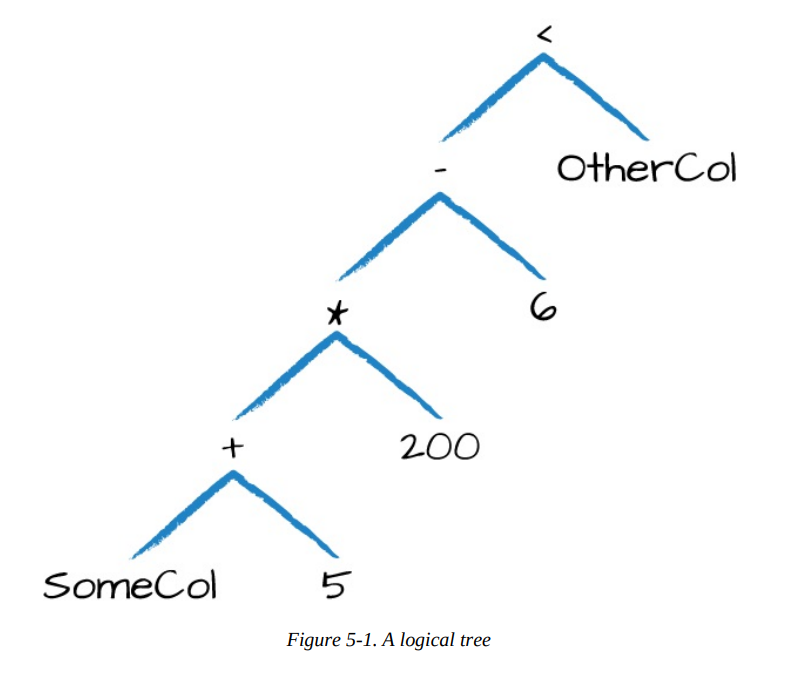 You can write your expressions as DataFrame code or as SQL expressions and get the exact same performance characteristics.
How the previous expression is actually valid SQL code, as well, just like you might put in a SELECT statement?
That’s because this SQL expression and the previous DataFrame code compile to the same underlying logical tree prior to execution.
Records and Rows
In Spark, each row in a DataFrame is a single record. Spark represents this record as an object of type Row. Row objects internally represent arrays of bytes.
Schema of DataFrame
Only DataFrames have schemas. Rows themselves do not have schemas.
DataFrame Transformations
Several core operations
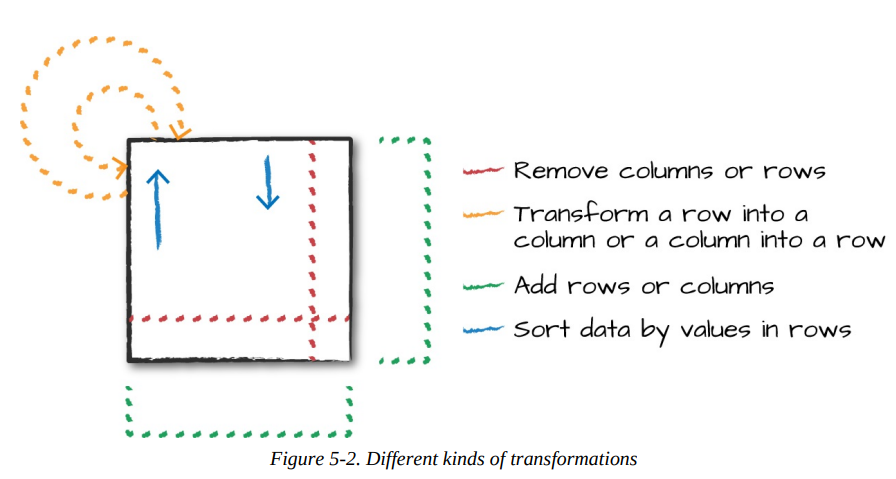
Select and selectExpr
You can refer to columns in a number of different ways; all you need to keep in mind is that you can use them interchangeably:
from pyspark.sql.functions import expr, col, column
df.select(
		  expr("DEST_COUNTRY_NAME"),
		  col("DEST_COUNTRY_NAME"),
		  column("DEST_COUNTRY_NAME")) \
	.show(2)
You can not do as the code below:
df.select(col("DEST_COUNTRY_NAME"), "DEST_COUNTRY_NAME")You can change the column name with expr or alias:
df.select(expr("DEST_COUNTRY_NAME AS destination")).show(2)
df.select(expr("DEST_COUNTRY_NAME").alias("destination")).show(2)
Because select followed by a series of expr is such a common pattern, Spark has a shorthand for doing this efficiently: selectExpr
df.selectExpr("DEST_COUNTRY_NAME as newColumnName", "DEST_COUNTRY_NAME").show(2)The selectExpr can build up complex expression:
df.selectExpr(
	"*", # all original columns
	"(DEST_COUNTRY_NAME = ORIGIN_COUNTRY_NAME) as withinCountry") \
	.show(2)

#+-----------------+-------------------+-----+-------------+ #|DEST_COUNTRY_NAME|ORIGIN_COUNTRY_NAME|count|withinCountry|
#+-----------------+-------------------+-----+-------------+
#|    United States|            Romania|   15|        false|
#|    United States|            Croatia|    1|        false|
#+-----------------+-------------------+-----+-------------+
With select expression, we can also specify aggregations over the entire DataFrame
df.selectExpr("avg(count)", "count(distinct(DEST_COUNTRY_NAME))").show(2)

#+-----------+---------------------------------+
#| avg(count)|count(DISTINCT DEST_COUNTRY_NAME)|
#+-----------+---------------------------------+
#|1770.765625|                              132|
#+-----------+---------------------------------+
Filtering Rows
You can use filter or where to filter an DataFrame
Spark automatically performs all filtering operations at the same time regardless of the filter ordering. This means that if you want to specify multiple AND filters, just chain them sequentially and let Spark handle the rest:
df.where(col("count") < 2).where(col("ORIGIN_COUNTRY_NAME") != "Croatia")\ .show(2)Getting Unique Rows
df.select("ORIGIN_COUNTRY_NAME", "DEST_COUNTRY_NAME").distinct().count()Concatenating and Appending Rows (Union)
To union two DataFrames, you must be sure that they have the same schema and number of columns; otherwise, the union will fail.
WARNING
Unions are currently performed based on location, not on the schema. This means that columns will not automatically line up the way you think they might.
from pyspark.sql import Row
schema = df.schema
newRows = [
	Row("New Country", "Other Country", 5L),
	Row("New Country 2", "Other Country 3", 1L)
]
parallelizedRows = spark.sparkContext.parallelize(newRows)
newDF = spark.createDataFrame(parallelizedRows, schema)
df.union(newDF)\
.where("count = 1")\
.where(col("ORIGIN_COUNTRY_NAME") != "United States")\
.show()
Sorting Rows
To more explicitly specify sort direction, you need to use the asc and desc functions if operating on a column. These allow you to specify the order in which a given column should be sorted:
from pyspark.sql.functions import desc, asc
df.orderBy(expr("count desc")).show(2)
df.orderBy(col("count").desc(), col("DEST_COUNTRY_NAME").asc()).show(2)
Sort with null
An advanced tip is to use
asc_nulls_first, desc_nulls_first, asc_nulls_last, or desc_nulls_lastto specify where you would like your null values to appear in an ordered DataFrame.
Optimization sort within partition
For optimization purposes, it’s sometimes advisable to sort within each partition before another set of transformations. You can use the
sortWithinPartitionsmethod to do this.
Example:
spark.read.format("json").load("/data/flight-data/json/*-summary.json")\ .sortWithinPartitions("count")Repartition and Coalesce (Optimization)
Another important optimization opportunity is to partition the data according to some frequently filtered columns, which control the physical layout of data across the cluster including the partitioning scheme and the number of partitions. Repartition will incur a full shuffle of the data, regardless of whether one is necessary. This means that you should typically only repartition when the future number of partitions is greater than your current number of partitions or when you are looking to partition by a set of columns:
df.rdd.getNumPartitions() # 1
df.repartition(5)
If you know that you’re going to be filtering by a certain column often, it can be worth repartitioning based on that column:
df.repartition(col("DEST_COUNTRY_NAME"))You can optionally specify the number of partitions you would like, too:
df.repartition(5, col("DEST_COUNTRY_NAME"))Coalesce, on the other hand, will not incur a full shuffle and will try to combine partitions. This operation will shuffle your data into five partitions based on the destination country name, and then coalesce them (without a full shuffle):
df.repartition(5, col("DEST_COUNTRY_NAME")).coalesce(2)Collecting Rows to the Driver
Spark maintains the state of the cluster in the driver. There are times when you’ll want to collect some of your data to the driver in order to manipulate it on your local machine.
collectDF = df.limit(10)
collectDF.take(5) # take works with an Integer count
collectDF.show() # this prints it out nicely
collectDF.show(5, False)
collectDF.collect()
The method toLocalIterator collects partitions to the driver as an iterator. This method allows you to iterate over the entire dataset partition-by-partition in a serial manner:
collectDF.toLocalIterator()WARNING
Any collection of data to the driver can be a very expensive operation! If you have a large dataset and call collect, you can crash the driver. If you use toLocalIterator and have very large partitions, you can easily crash the driver node and lose the state of your application. This is also expensive because we can operate on a one-by-one basis, instead of running computation in parallel.
References
- Spark: The Definitive Guide by Bill Chambers and Matei Zaharia.