
Overview
Two types of “distributed shared variables”:
- broadcast variables (let you save a large value on all the worker nodes and reuse it in many Spark actions without re-sending it to the cluster).
- accumulators (let you add together data from all the tasks into a shared result).
Broadcast Variables
It’s a way you can share an immutable value efficiently around the cluster without encapsulating that variable in a function closure. If you use the same variable in multiple Spark actions and jobs, it will be re-sent to the workers with every job instead of once.
Broadcast variables are shared, immutable variables that are cached on every machine in the cluster instead of serialized with every single task. The canonical use case is to pass around a large lookup table that fits in memory on the executors and use that in a function.
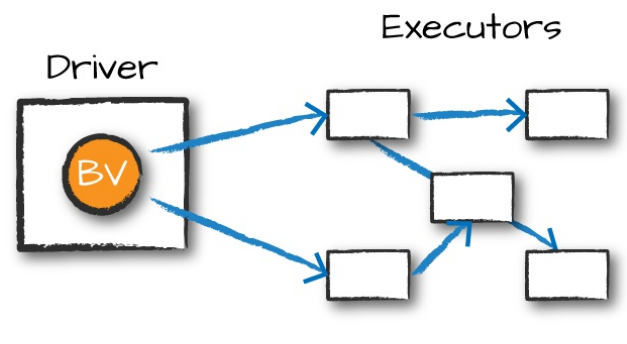
For example, suppose that you have a list of words or values:
my_collection = "Spark The Definitive Guide : Big Data Processing Made Simple".split(" ")

words = spark.sparkContext.parallelize(my_collection, 2)
You would like to supplement your list of words with other information that you have, which is many kilobytes, megabytes, or potentially even gigabytes in size. This is technically a right join if we thought about it in terms of SQL:
supplementalData = {
	"Spark":1000, "Definitive":200, "Big":-300, "Simple":100}
We can broadcast this structure across Spark and reference it by using suppBroadcast. This value is immutable and is lazily replicated across all nodes in the cluster when we trigger an action:
suppBroadcast = spark.sparkContext.broadcast(supplementalData)

# reference this value via the `value` method
suppBroadcast.value
INFO
This can save you a great deal of serialization and deserialization costs because Spark transfers data more efficiently around the cluster using broadcasts.
Now we could transform our RDD using this value. In this instance, we will create a key–value pair according to the value we might have in the map. If we lack the value, we will simply replace it with 0:
words.map(
	lambda word: (word, suppBroadcast.value.get(word, 0)))\
.sortBy(lambda wordPair: wordPair[1])\
.collect()

# The output
[('Big', -300), ('The', 0), ... ('Definitive', 200), ('Spark', 1000)]
The only difference between this and passing it into the closure is that we have done this in a much more efficient manner (Naturally, this depends on the amount of data and the number of executors. For very small data (low KBs) on small clusters, it might not be). Although this small dictionary probably is not too large of a cost, if you have a much larger value, the cost of serializing the data for every task can be quite significant.
NOTE
One thing to note is that we used this in the context of an RDD; we can also use this in a UDF or in a Dataset and achieve the same result.
Accumulators
Spark’s second type of shared variable, are a way of updating a value inside of a variety of transformations and propagating that value to the driver node in an efficient and fault-tolerant way.
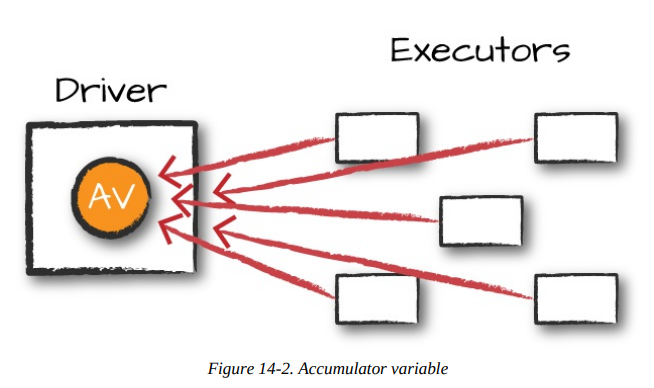 Accumulators provide a mutable variable that a Spark cluster can safely update on a per-row basis.
HINT
We can use accumulator for debugging purpose or to create low-level aggregation.
Spark natively supports accumulators of numeric types, and programmers can add support for new types.
INFO
For accumulator updates performed inside actions only, Spark guarantees that each task’s update to the accumulator will be applied only once, meaning that restarted tasks will not update the value. In transformations, you should be aware that each task’s update can be applied more than once if tasks or job stages are reexecuted.
Accumulators do not change the lazy evaluation model of Spark.
Accumulators do not change the lazy evaluation model of Spark. If an accumulator is being updated within an operation on an RDD, its value is updated only once that RDD is actually computed (e.g., when you call an action on that RDD or an RDD that depends on it). Consequently, accumulator updates are not guaranteed to be executed when made within a lazy transformation like map().
Accumulators can be both named and unnamed. Named accumulators will display their running results in the Spark UI, whereas unnamed ones will not.
Basic Example
Let’s experiment by performing a custom aggregation on the Flight dataset. We will use the Dataset API as opposed to the RDD API, but the extension is quite similar:
flights = spark.read\
	.parquet("/data/flight-data/parquet/2010-summary.parquet")
Now let’s create an accumulator that will count the number of flights to or from China. Even though we could do this in a fairly straightforward manner in SQL, many things might not be so straightforward. Accumulators provide a programmatic way of allowing for us to do these sorts of counts. The following demonstrates creating an unnamed accumulator:
accChina = spark.sparkContext.accumulator(0)

def accChinaFunc(flight_row):
	destination = flight_row["DEST_COUNTRY_NAME"]
	origin = flight_row["ORIGIN_COUNTRY_NAME"]
	if destination == "China":
		accChina.add(flight_row["count"])
	if origin == "China":
		accChina.add(flight_row["count"])
Now, let’s iterate over every row in our flights dataset via the foreach method. The reason for this is because foreach is an action, and Spark can provide guarantees that perform only inside of actions.
The foreach method will run once for each row in the input DataFrame (assuming that we did not filter it) and will run our function against each row, incrementing the accumulator accordingly:
flights.foreach(lambda flight_row: accChinaFunc(flight_row))

# query
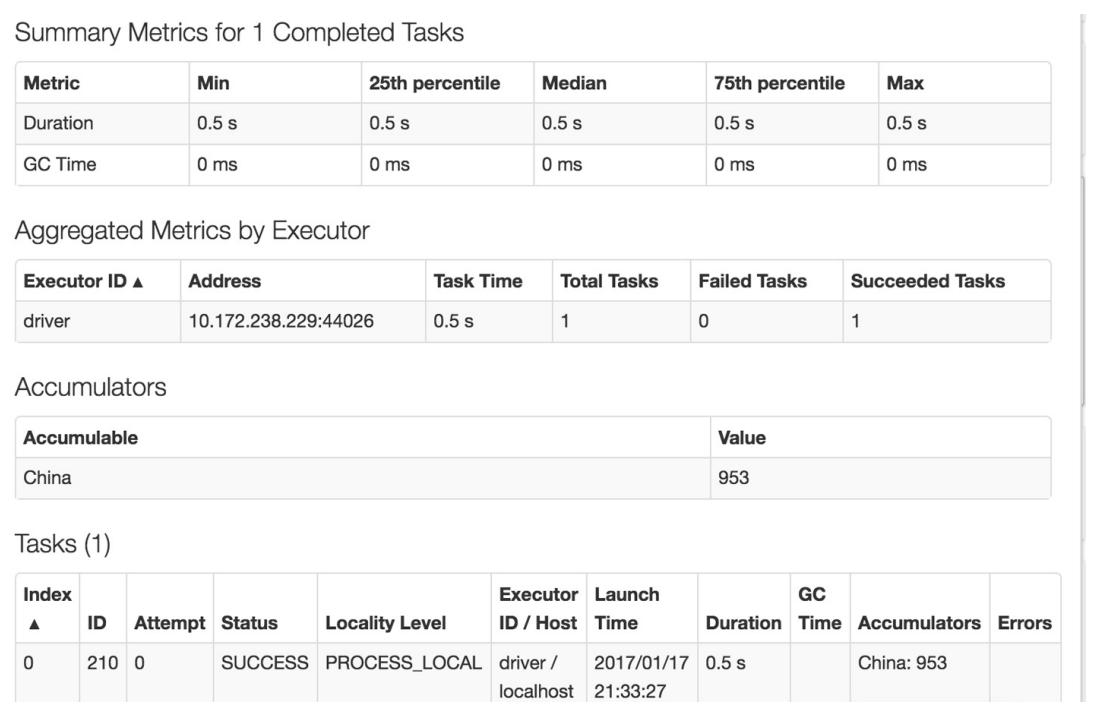
accChina.value # 953
This will complete fairly quickly, but if you navigate to the Spark UI, you can see the relevant value, on a per-Executor level, even before querying it programmatically, as demonstrated in
Custom Accumulators
To custom Accumulator you need to subclass the AccumulatorV2 class.
from pyspark.accumulators import AccumulatorParam

class VectorAccumulatorParam(AccumulatorParam):
    def zero(self, value):
        return [0.0] * len(value)
    def addInPlace(self, val1, val2):
        for i in range(len(val1)):
             val1[i] += val2[i]
        return val1
va = sc.accumulator([1.0, 2.0, 3.0], VectorAccumulatorParam())
va.value

def g(x):
    global va
    va += [x] * 3

rdd = sc.parallelize([1,2,3])
rdd.foreach(g)
va.value
References
- Spark: The Definitive Guide by Bill Chambers and Matei Zaharia.