

Overview
Different with row-wise format, that store data as records, one after another, like database
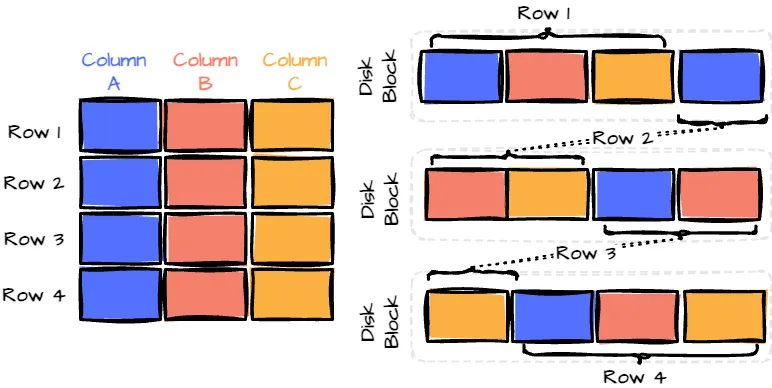 This format only efficient for access entire record frequently
So, for the analysis this format inefficient
This format only efficient for access entire record frequently
So, for the analysis this format inefficient
Example
For example, imagine a table with 50 columns and millions of rows. If you’re only interested in analyzing 3 of those columns, a row-wise format would still require you to read all 50 columns for each row.
The columnar format will address this issue of row-wise. That format only access specific columns to get it and avoid scan all how-to-colmunar-store.png]]But, this format have some downside for write and update in large data
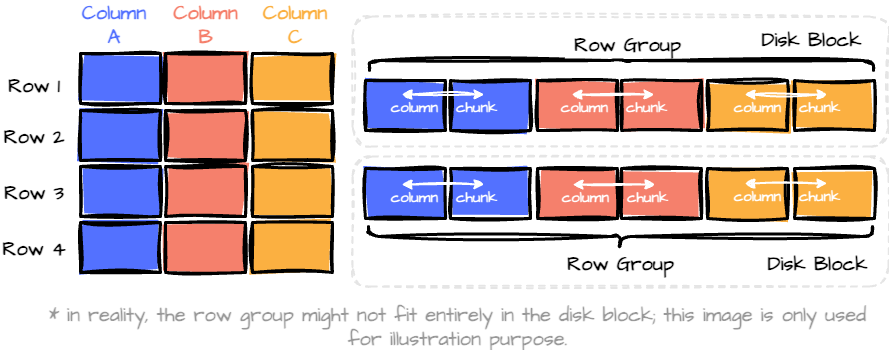
The hybrid format combines the best of both worlds.
Example
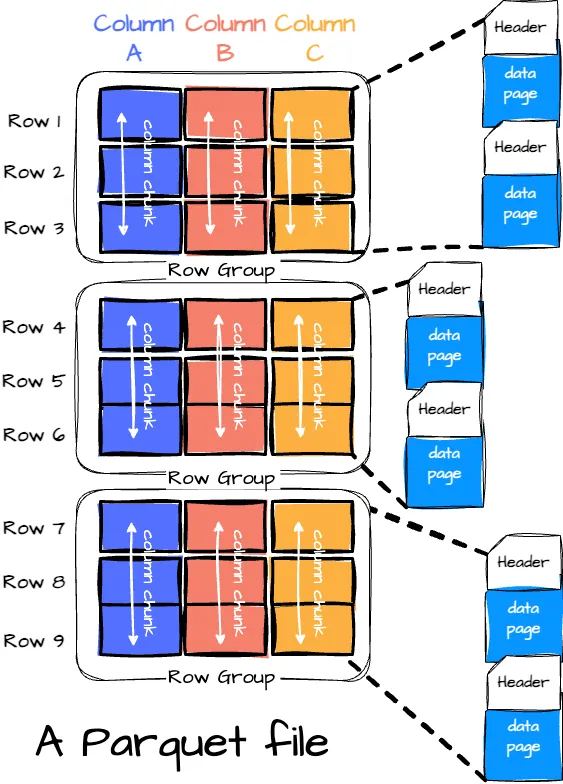
The format groups data into “row groups,” each containing a subset of rows. (horizontal partition.) Within each row group, data for each column is called a “column chunk.” (vertical partition)
INFO
A Parquet file is composed of:
- Row Groups: Each row group contains a subset of the rows in the dataset. Data is organized into columns within each row group, each stored in a column chunk.
- Column Chunk: A chunk is the data for a particular column in the row group.
- Pages: Column chunk is further divided into pages. A page is the smallest data unit in Parquet. There are several types of pages, including data pages (which contain the actual data), dictionary pages (which contain dictionary-encoded values), and index pages (used for faster data lookup).
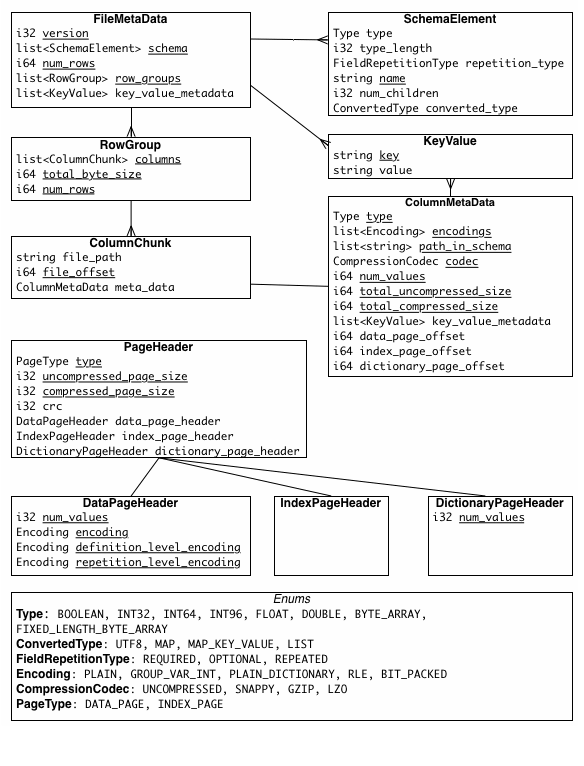
the metadata is the crucial part of Parquet:
How is data written in the Parquet format?
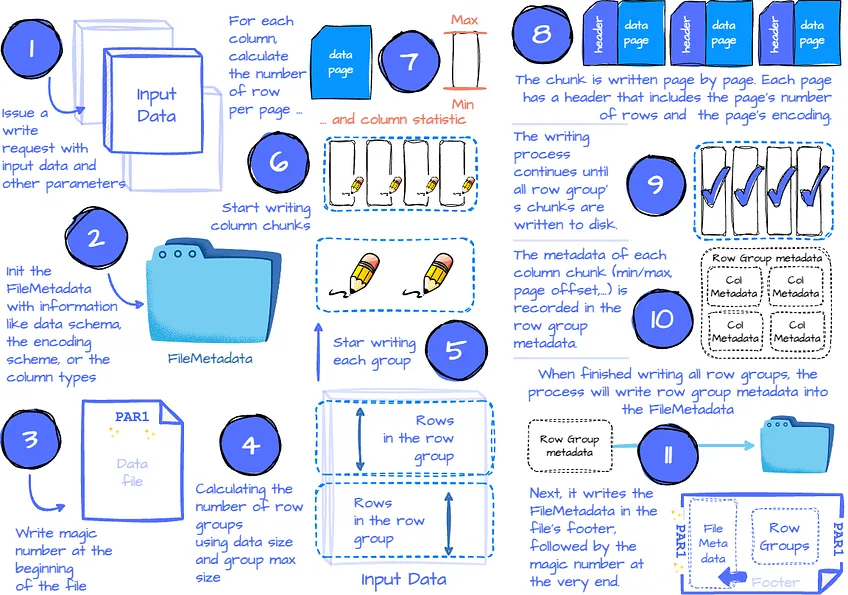
- The application issues a written request with parameters like the data, the compression scheme for each column (optional), the encoding scheme for each column (optional), the file scheme (write to one file or multiple files), custom metadata, etc.
- The Parquet Writer first collects information, such as the data schema, the null appearance, the encoding scheme, and all the column types, which are recorded in FileMetadata.
- Next, the Writer writes the magic number at the beginning of the file.
- Then, it calculates the number of row groups based on the row group’s max size (configurable) and the data’s size. This step also determines which subset of data belongs to which row group. After that, it starts the physical writing process for each row group.
- For each row group, it iterates through the column list to write each column chunk for the row group. This step will use the compression scheme specified by the user (the default is none) to compress the data when writing the chunks.
- The chunk writing process begins by calculating the number of rows per page using the max page size and the chunk size. Next, it will try to calculate the column’s min/max statistic. (This calculation is only applied to columns with a measurable type, such as integer or float.)
- Then, the column chunk is written page by page sequentially. Each page has a header that includes the page’s number of rows, the page’s encoding for data, repetition, and definition. If dictionary encoding is used for that column, the dictionary page is stored before the data page. A dictionary page also has the associated page header.
- After writing all the pages for the column chunk, the Parquet Writer constructs the column chunk metadata for that chunk, which includes information like min/max of the column (if has), total_uncompressed_size, total_compressed_size, the first data page offset, the first dictionary page offset.
- The column chunk writing process continues until all columns in the row group are written to disk, ensuring that the column chunks are stored contiguously. The metadata for each column chunk is recorded in the row group metadata.
- After writing all the row groups, all row groups’ metadata is recorded in the FileMetadata.
- The FileMetadata is written to the footer.
- The entire process finishes by writing the magic number at the end of the file.
How about the reading process?
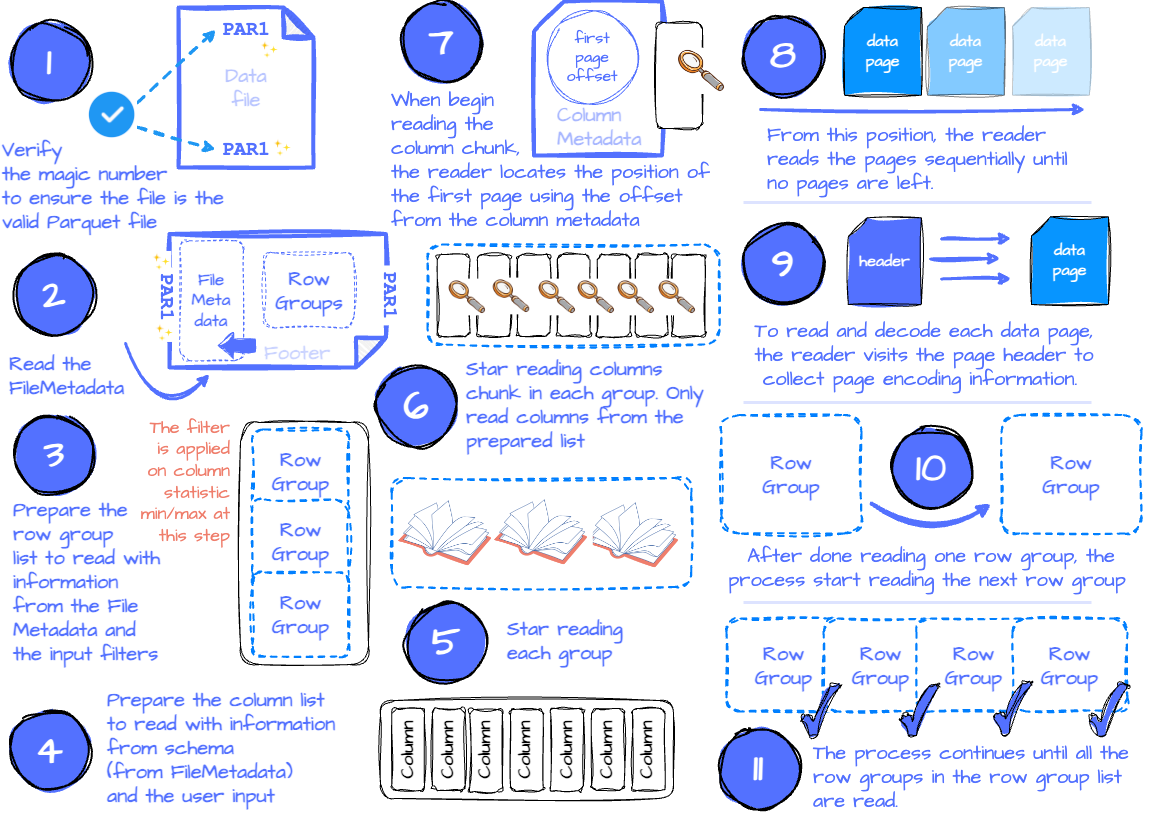
- The application issues a read request with parameters such as the input file, filters to limit the number of read row groups, the set of desired columns, etc.
- If the application requires verification that it’s reading a valid parquet file, the reader will check if there is a magic number at the beginning and end of the file by seeking the first and last four bytes.
- It then tries to read the FileMetadata from the footer. It extracts information for later use, such as the file schema and the row group metadata.
- If filters are specified, they will limit the scanned row groups. This is because the row groups contain all the column chunks’ metadata, which includes each measurable column chunk’s min/max statistics; the reader only needs to iterate to every row group and check the filters against each chunk’s statistic. If it satisfies the filters, this row group is appended to the list of row groups, which is later used to read. If there are no filters, the list contains all the row groups.
- Next, the reader defines the column list. If the application specifies a subset of columns it wants to read, the list only contains these columns. Otherwise, the list contains all the columns.
- The next step is reading the row groups. The reader will iterate through the row group list and read each row group.
- The reader will read the column chunks for each row group based on the column list. It used ColumnMedata to read the chunk.
- When reading the column chunk for the first time, the reader locates the position of the first data page (or dictionary page if dictionary encoding is used) using the first page offset in the column metadata. From this position, the reader reads the pages sequentially until no pages are left. To know if there is any remaining data, the reader keeps track of the current number of read rows and compares it to the chunk’s total number of rows. The reader has read all the chunk data if the two numbers are equal.
- To read and decode each data page, the reader visits the page header to collect information like the value encoding, the definition, and the repetition level encoding.
- After reading all the row group’s column chunks, the reader moves to read the following row groups.
- The process continues until all the row groups in the row group list are read.
Encoding
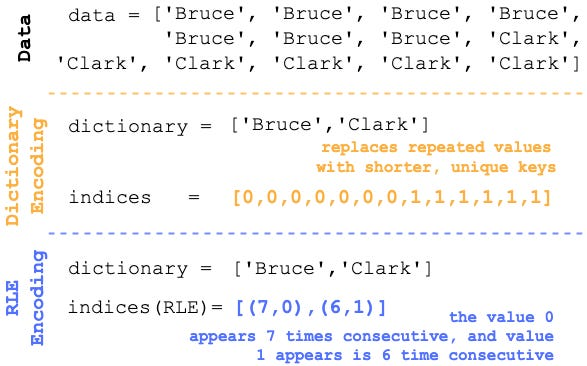
Parquet leverages techniques like dictionary encoding and run-length encoding (RLE) to significantly reduce storage space. After dictionary encoding, the data is further run-length encoded in Parquet.
Example
SELECT column_A, SUM(column_B)
FROM my_table
WHERE column_C < 10
GROUP BY column_A